Train tickets
Find trains, choose available seats and keep your ticket on your phone.
- Booked directly in the UZ system
- Visa · Mastercard · Apple Pay · Google Pay
- Ticket right on your phone
Train delay board
Full board →25 delayed trains
UZ data updated 06:46Popular routes
All routes →The reservation confirms the ticket price. Review the amount before proceeding to payment.
A ticket in three steps
Live UZ schedule: times, duration, free seats and class prices — one board, with filters.
Real car occupancy: lower/upper, compartment or side. Up to 4 tickets — even from different trains.
Your reservation is held for 30 minutes. Visa, Mastercard, Apple Pay, Google Pay — the ticket arrives by email and in your account.
Застосунок
Всі рейси УЗ — у застосунку AnyTrain
- Пошук і купівля за 2 хвилини — місце обираєте на реальній схемі вагона
- Живе табло затримок і статус вашого поїзда з прогнозом прибуття
- Нагадування про виїзд з номером вагона і місця, QR-квиток — провіднику з екрана




Часті питання
Коротко про головне
Не знайшли відповідь? Заходьте у Центр підтримки — там повна база й жива команда.
What types of train tickets are available?
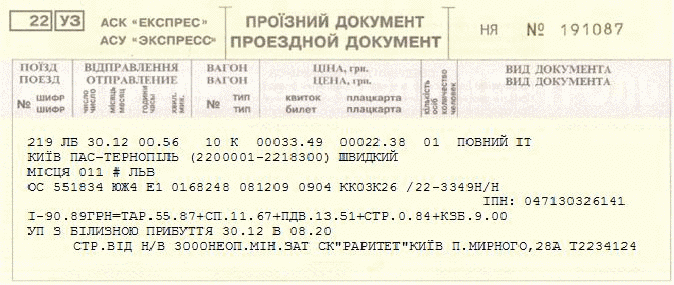
1. Official Train Ticket
An official train ticket printed on a Ukrainian Railways (Ukrzaliznytsia) secure ticket form. This ticket allows you to board the train.
This type of ticket is available only at railway ticket offices.
2. Online Reservation Form
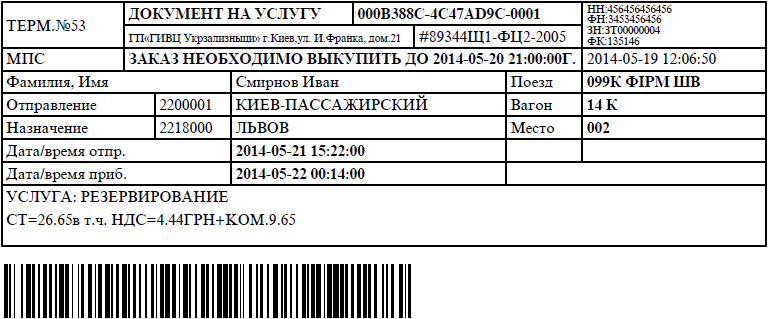
A document you receive when reserving a train ticket for up to two days.
It contains your journey details, including the train number, departure date and time, carriage type, seat number, ticket price, a unique booking number, and the deadline for purchasing the ticket at a railway ticket office.
You should save or print the reservation form, or at least write down the unique booking code.
To purchase your ticket, present the printed reservation form or its unique booking code at an official Ukrainian Railways (Ukrzaliznytsia) ticket office in mainland Ukraine before the reservation expires.
3. Online Booking Confirmation
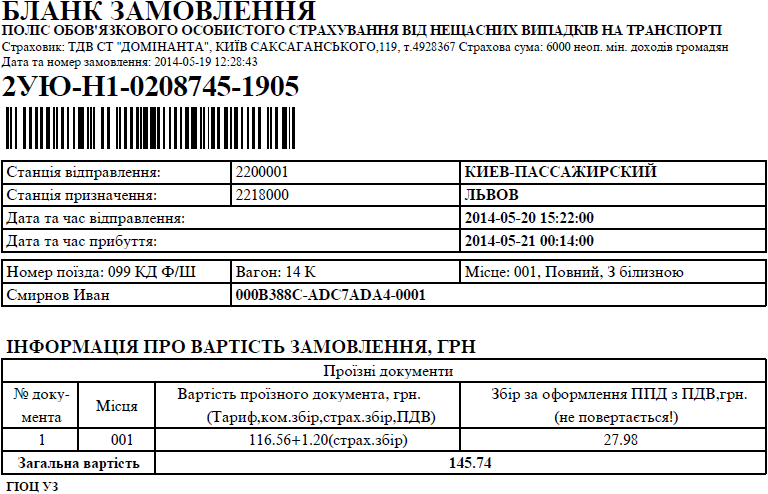
A document you receive after paying for a train ticket online.
It contains your journey details, including the train number, departure date and time, carriage type, seat number, ticket price, and a unique booking number.
This document is not a valid boarding pass. You must save or print it, or at least write down the unique booking code.
Present the printed booking confirmation or the unique booking code at an official Ukrainian Railways (Ukrzaliznytsia) ticket office in mainland Ukraine to receive your official train ticket free of charge.
4. Electronic Train Ticket
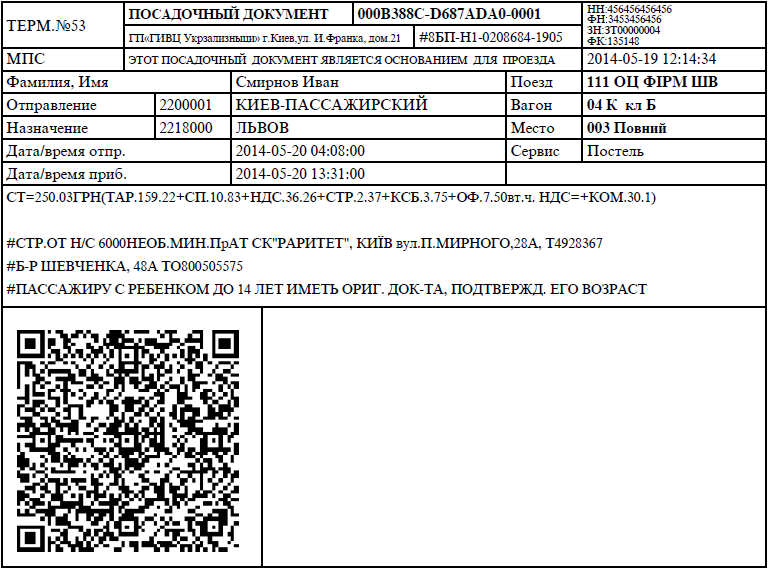
A document you receive after purchasing a train ticket online.
Unlike the online booking confirmation, an electronic train ticket is a valid travel document and allows you to board the train directly. There is no need to visit a railway ticket office.
The electronic ticket contains a QR code, which is scanned by the train conductor during boarding.
5. Online Booking Confirmation for a Transportation Document
A document you receive after paying online for the transportation of additional baggage.
It contains your journey details, information about the additional baggage, and a unique booking number.
You should save or print this document, or at least write down the unique booking code.
Present the printed transportation booking confirmation or the unique booking code at an official Ukrainian Railways (Ukrzaliznytsia) ticket office in mainland Ukraine to receive the official transportation document free of charge.

What should I do with my ticket if I missed the train?
If you missed your train for personal reasons, you must contact the railway station ticket office within 1 hour after the train's departure to receive a partial refund.
If your trip did not take place due to the railway's fault, all financial matters regarding a possible refund are handled through the claims procedure.
How can I check the train schedule?
To view the train schedule for your desired route in a convenient format, open the "Train Schedule" tab, select your departure station and destination station, then click "View Schedule."
The system will display a list of trains operating between the selected stations, regardless of whether tickets are currently available.
If there are no tickets available for direct trains, or if there is no direct rail connection between the selected stations, you can search for routes with a transfer.
To do this, select the "With Transfer" option and, if desired, specify your preferred transfer time.
The system will then display the most suitable train routes with a transfer.
Travel Conditions for Students
According to the Resolution of the Cabinet of Ministers of Ukraine No. 541 of April 5, 1999, "On Approval of the Procedure for Providing Discounted Travel to Students of Higher Education Institutions (Accreditation Levels I–IV) and Students of Vocational Education Institutions on Urban, Suburban, Intercity Road and Railway Transport within Ukraine", discounted travel on long-distance trains is available only if the passenger's student status is confirmed through the Unified State Electronic Database on Education (EDEBO), established in accordance with Resolution of the Cabinet of Ministers of Ukraine No. 752 of July 13, 2011.
The official formats of student ID cards are approved by Order No. 810 of the Ministry of Education and Science of Ukraine dated December 10, 2003, "On Approval of the Standard Student and Pupil ID Cards".
Please note that students of higher education institutions (Accreditation Levels I–IV) and students of vocational education institutions are entitled to a 50% discount on both the ticket fare and the seat reservation fee when travelling within Ukraine in:
- standard (general) carriages;
- platzkart (open-sleeper) carriages;
- 2nd- and 3rd-class carriages on trains of all categories;
- all carriages on regional trains.
When travelling within Ukraine on trains operated by foreign railway companies, the discount applies only to the ticket fare. The seat reservation fee must be paid in full.
General Terms and Conditions for the Refund of Travel Documents
Refunds for train tickets are processed in accordance with the Rules for the Carriage of Passengers, Baggage, Cargo Baggage, and Mail by Rail in Ukraine (as amended).
Refunds for unused tickets may be obtained at any railway ticket office operated by the carrier by presenting the ticket and a valid identity document specified in Section 7.2 of these Rules.
Before the train departs, a ticket may be refunded either by the passenger or by another person on the passenger's behalf.
After the train has departed, a ticket may only be refunded upon presentation of the identity document of the person whose name appears on the ticket.
The surname, first name, patronymic (if applicable), and place of residence of the person returning the ticket are recorded during manual processing or entered on the reverse side of the Express auxiliary form when using automated systems.
For both manual and electronic refunds, the staff member processing the refund records the type, series, and number of the identity document, the issuing authority, the date of issue, and the holder's place of residence. If a document other than a passport is presented, the place of residence is recorded based on the information provided by the presenter.
A ticket office clerk may process refunds for up to nine unused tickets for a single passenger in one transaction, regardless of destination, including return tickets or tickets for the connecting leg of a journey.
If a passenger cancels a trip for personal reasons, the refund is as follows:
- 15–20 days before departure — 100% of the fare;
- 10–14 days before departure — 90–95% of the fare;
- 5–9 days before departure — 75% of the fare;
- 1–4 days before departure — 50% of the fare;
- Less than 24 hours before departure, but no later than 1 hour after departure, only the ticket fare is refunded; the seat reservation fee is non-refundable.
For trains with a 10-day advance booking period:
- 10 days before departure — 95% refund;
- 5–9 days before departure — 75% refund;
- 1–4 days before departure — 50% refund;
- Less than 24 hours before departure, but no later than 1 hour after departure, only the ticket fare is refunded; the seat reservation fee is not refunded.
In all refund cases, except those caused by the carrier, the passenger must pay the applicable service (processing) fee. Charges paid for seat reservation and ticket issuance are non-refundable unless the refund is due to the carrier's fault.
If the refund is made due to the carrier's fault, the passenger receives a full refund of all amounts paid for the ticket, including seat reservation service fees.
If the amount remaining after deductions is equal to or less than the refund processing fee, no refund processing fee will be charged.
How do I book train tickets?
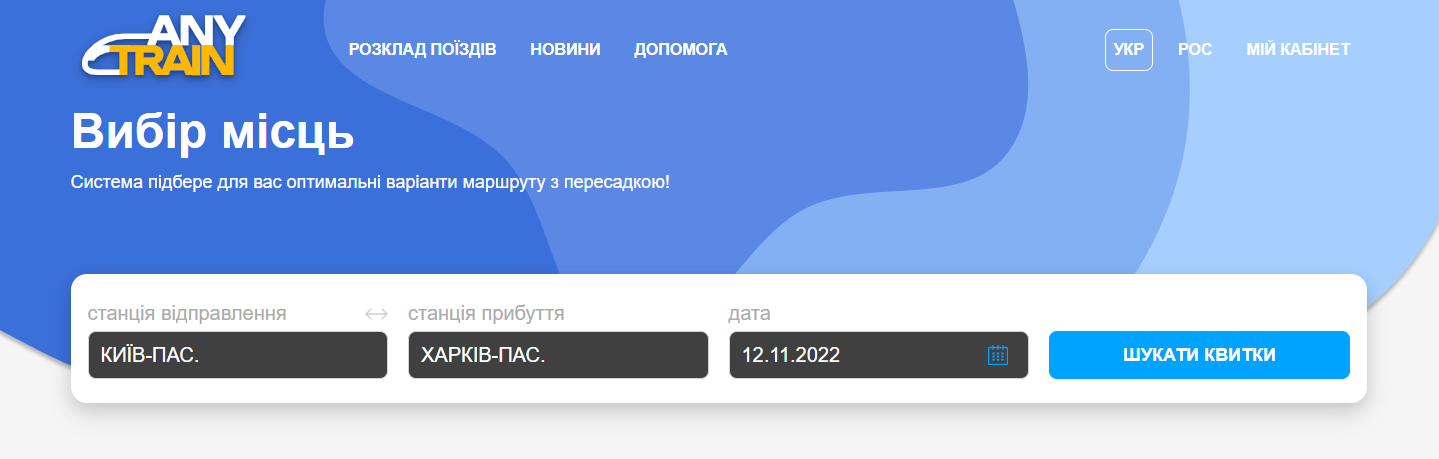
1. Choose your route and departure date
To buy train tickets online, enter your departure and destination stations, as well as your travel date. You can also specify your preferred departure time. Click "Find Ticket" to search for available trains. The search may take a few moments.
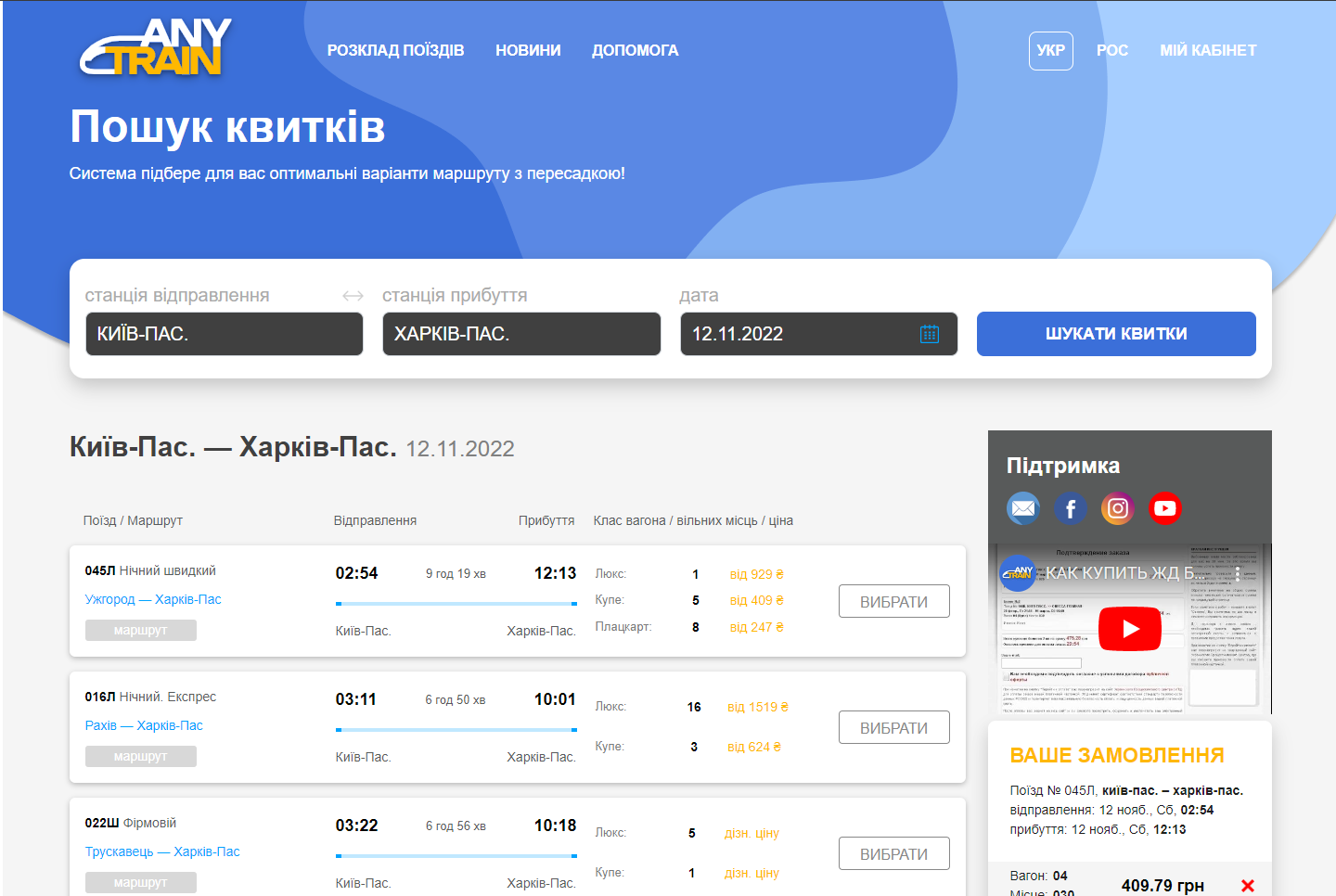
2. Select a train
On the next step, you will see a list of available trains and the carriage classes with available seats. To choose a carriage, click the button corresponding to your preferred carriage type.
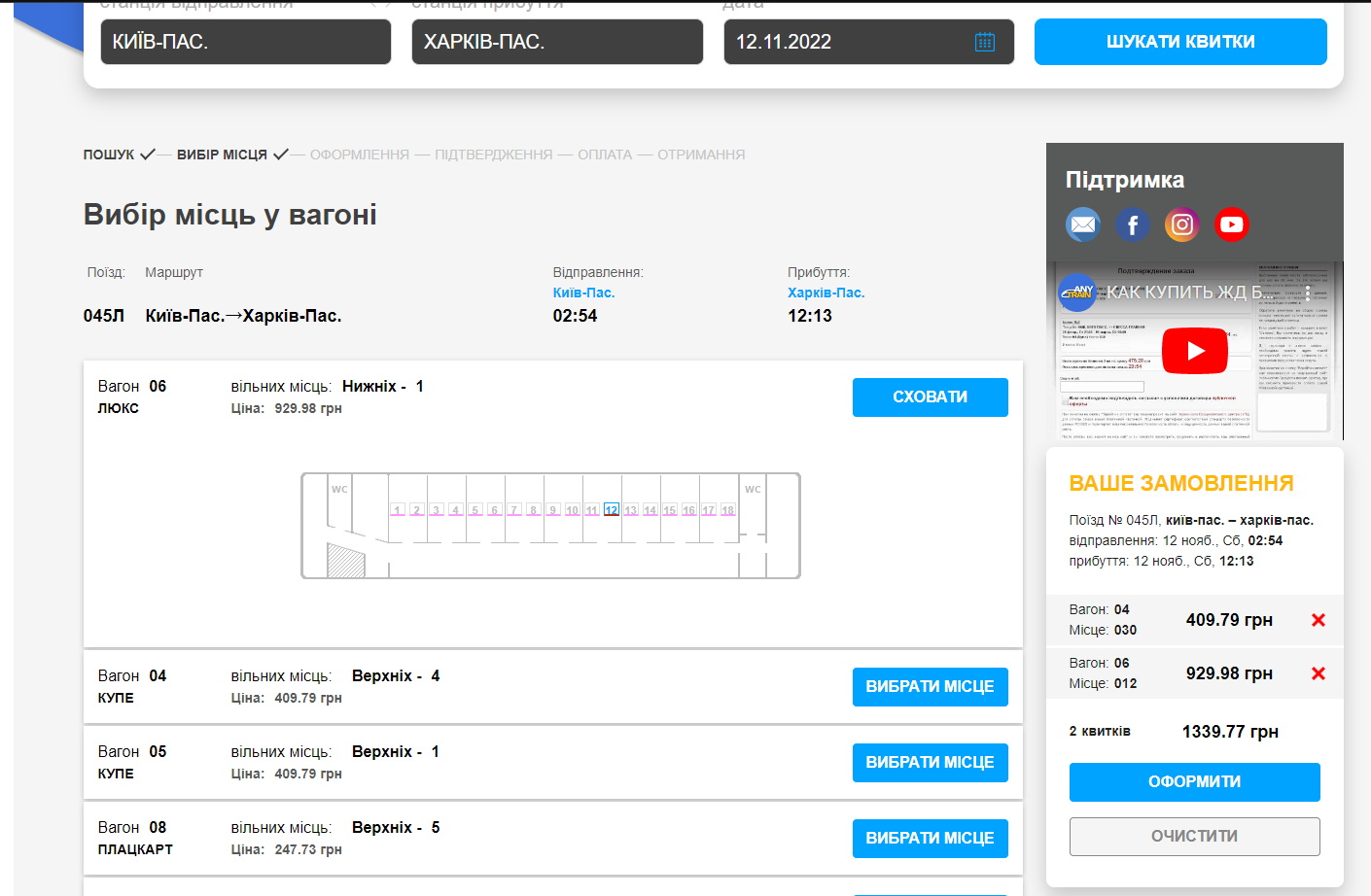
3. Select your seats
Next, choose your carriage and seat(s). You can browse other carriage types by clicking the corresponding carriage type button. To search for seats on a different train, click "Continue Search".
Before you select any tickets, helpful booking information is displayed on the right side of the screen. Once you begin selecting seats, they will appear in the "Your Order" section. You can remove a selected ticket by clicking the × next to it.
After selecting all the seats you need, click "Proceed to Booking".
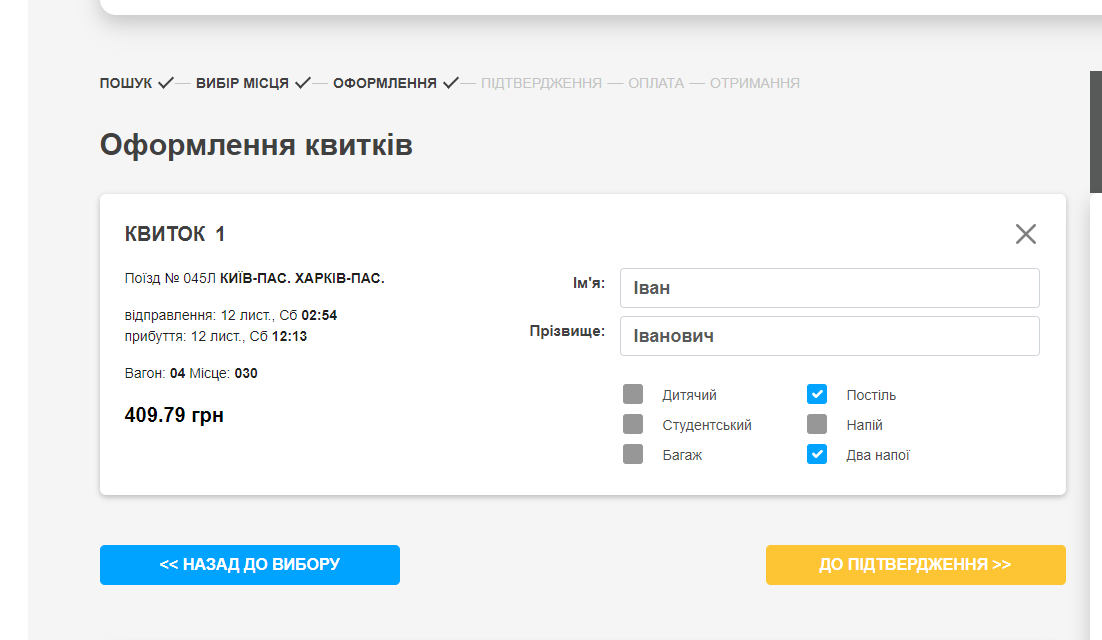
4. Complete your booking
For each ticket, enter the passenger's first and last name and choose whether you want to reserve the ticket or purchase it.
The passenger's first and last name must exactly match the information in their identity document.
If you are purchasing a ticket for a child, select the appropriate option and enter the child's date of birth. The exact child fare will be calculated at the next step.
If you plan to travel with animals, special equipment, or baggage exceeding the free baggage allowance, select the appropriate option.
Carefully review all the information you entered and click "Continue".
At this point, your selected seats will be reserved for 30 minutes while you complete the payment.
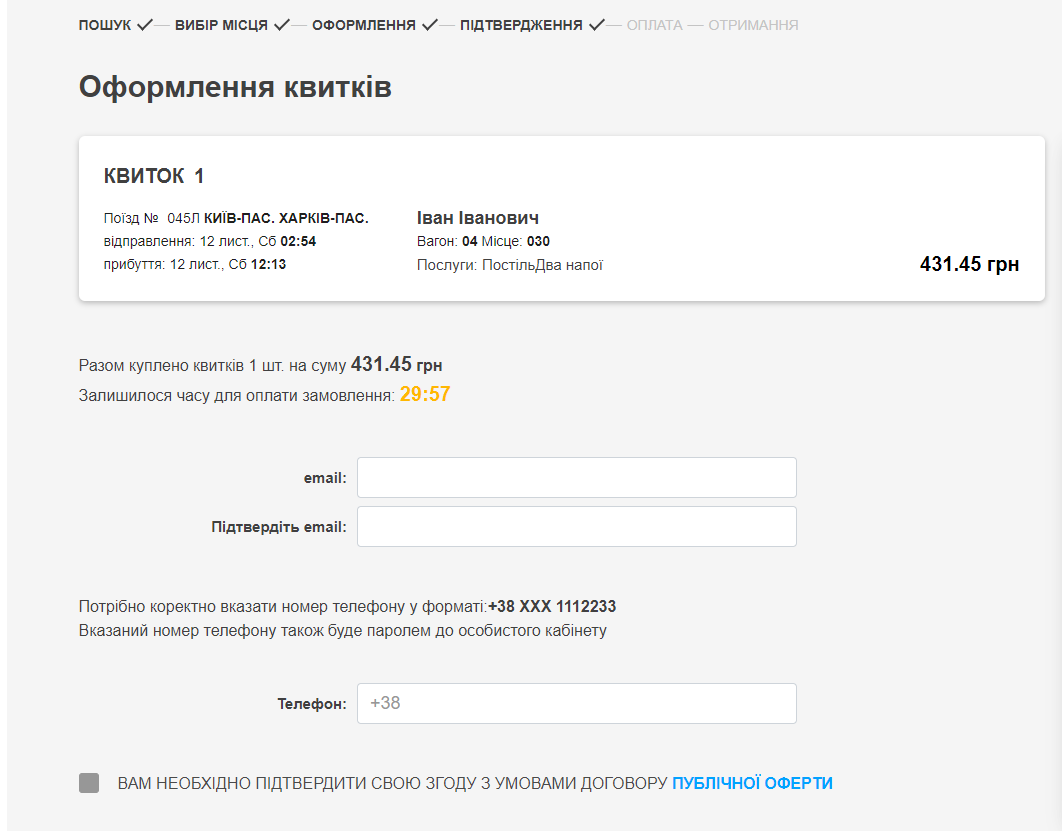
5. Confirm your order
Review your selected tickets and passenger information.
Please pay attention to the displayed ticket price—it is the final total amount.
Enter your email address, read and accept the terms of the public offer, and click "Proceed to Payment".
6. Pay for your order
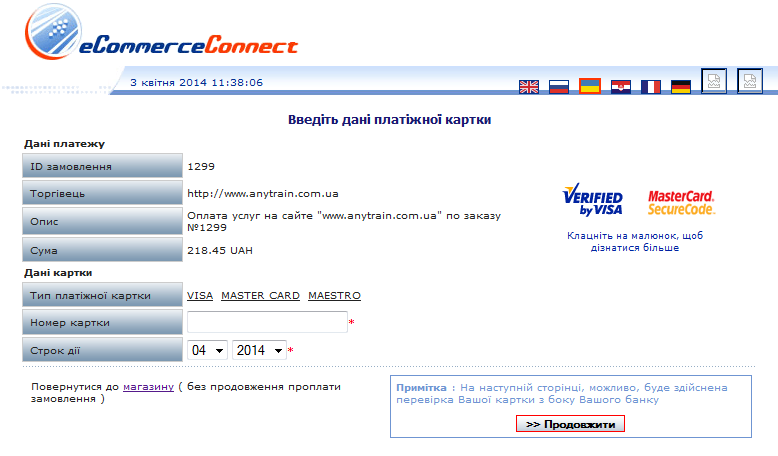
To complete your purchase, enter your payment card number, expiration date, and email address in the secure payment window, then click "Continue".
Next, enter your CVV/CVC security code and click "Continue" again.
7. Receive your tickets
Once your payment has been successfully processed, a confirmation message will appear. You can open or save your booking confirmation by clicking the appropriate button. It is recommended that you print the booking confirmation or at least write down the unique booking code.
A confirmation email containing your order details will also be sent to your email address.
Present the printed booking confirmation or the unique booking code at an official Ukrainian Railways (Ukrzaliznytsia) ticket office in mainland Ukraine to receive your official train ticket.
If you only reserved your ticket, you will also need to pay the full ticket price at the ticket office.
If you purchased an electronic ticket (your booking confirmation contains a QR code), you do not need to visit a railway ticket office. Simply present the printed electronic ticket with the QR code to the train conductor when boarding.
When you purchase train tickets on our website for the first time, you are automatically registered in our system. A password for accessing your personal account will be sent to the email address you provided during booking. Your personal account contains the history of all your orders.
How are refunds processed for unused travel or transportation documents purchased through electronic channels?
Refunds for unused travel or transportation documents purchased through electronic channels are processed as follows:
- Before the train's departure, the passenger may request a refund independently through the electronic service used to purchase the ticket.
- After the train has departed, but no later than one hour after its departure, refunds may be processed at the ticket office of the departure station.
In all other cases, requests for refunds of unused travel or transportation documents purchased through electronic channels are considered by the carrier through the claims procedure.
Refunds are issued to the account of the payment card used to purchase the ticket.
Refunds for electronic travel or transportation documents stored on electronic devices can only be processed at ticket offices after the passenger has printed the electronic document on paper.